Overview
Email templates are useful if you send multiple Sales Order documents to your logistics company and you would like to use a customized, standard email format for them.
It is possible to create multiple email templates in Cin7 Omni. You can then email your sales orders to your customers.
Create a new email template
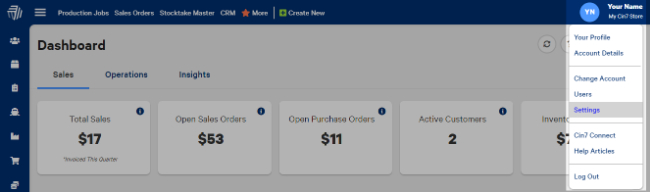
- While logged in as the Administrator, select your username in the top right and then Settings.
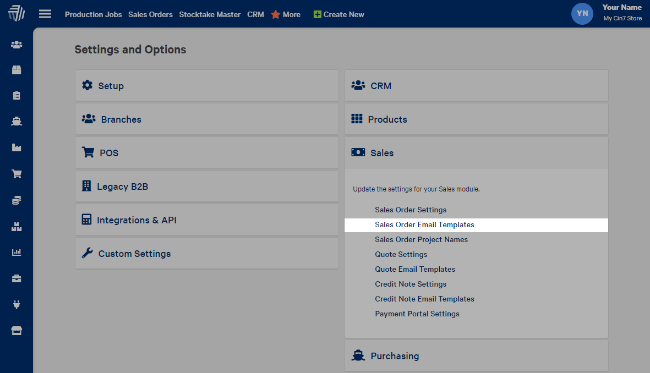
- From the Sales menu, select Sales Order Email Templates. Then select Create New.
- Select Design to copy the settings from the existing template to the new template.

- Make the required modifications and select Save.
Default from (sender) address
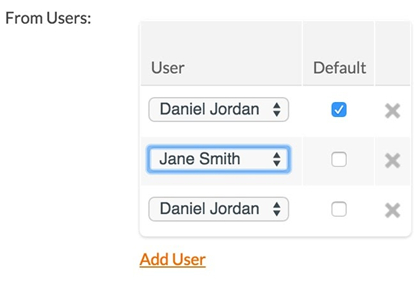
You can set a default From email address for a template. This will mean that every email will be sent with a specific sender address, regardless of the user that sends the email.
Default From email addresses must belong to a user of the system.
Simply add a user or users to the From Users list:
Default CC/BCC address
You can select a Default CC or Default BCC for your email template; this will cc: or bcc: the same person every time this template is sent.
To do this, simply add their email address to the Default CC and/or Default BCC fields:

Dynamic fields
You can insert dynamic fields into your email templates; these are fields that will change for each email depending on certain fields within the order itself. An example may be First name, which changes based on the recipient.
- Insert your cursor into the email template at the place you would like to insert the field.
- Type "%" and you will see a list of possible dynamic fields.
- Select from the list and the variable for the dynamic field will be inserted into your email.
| Type | Tag | Description |
|---|---|---|
| CreatedDate | %%ATT:CreatedDate%% | Displays the created date of the sales order. |
| FirstName | %%ATT:FirstName%% | Displays the first name of the contact. |
| LastName | %%ATT:LastName%% | Displays the last name of the contact. |
| Company | %%ATT:Company%% | Displays the name of the company. |
| %%ATT:Email%% | Displays the email address of the contact/company. | |
| Phone | %%ATT:Phone%% | Displays the phone number of the contact/company. |
| Mobile | %%ATT:Mobile%% | Displays the mobile number of the contact/company. |
| Fax | %%ATT:Fax%% | Displays the fax number of the contact/company. |
| DeliveryFirstName | %%ATT:DeliveryFirstName%% | Displays the first name of the contact who will receive the sales order products. |
| DeliveryLastName | %%ATT:DeliveryLastName%% | Displays the last name of the contact who will receive the sales order products. |
| DeliveryCompany | %%ATT:DeliveryCompany%% | Displays the company name of the contact who will receive the sales order products. |
| DeliveryStreet | %%ATT:DeliveryStreet%% | Displays the street name of the contact who will receive the sales order products. |
| DeliverySuburb | %%ATT:DeliverySuburb%% | Displays the suburb name of the contact who will receive the sales order products. |
| DeliveryCity | %%ATT:DeliveryCity%% | Displays the city name of the contact who will receive the sales order products. |
| DeliveryState | %%ATT:DeliveryState%% | Displays the state name of the contact who will receive the sales order products. |
| DeliveryPostalCode | %%ATT:DeliveryPostalCode%% | Displays the postal code of the contact who will receive the sales order products. |
| DeliveryCountry | %%ATT:DeliveryCountry%% | Displays the country name of the contact who will receive the sales order products. |
| BillingFirstName | %%ATT:BillingFirstName%% | Displays the first name of the contact who will be billed for the sales order. |
| BillingLastName | %%ATT:BillingLastName%% | Displays the last name of the contact who will be billed for the sales order. |
| BillingCompany | %%ATT:BillingCompany%% | Displays the company name of the contact who will be billed for the sales order. |
| BillingStreet | %%ATT:BillingStreet%% | Displays the street name of the contact who will be billed for the sales order. |
| BillingSuburb | %%ATT:BillingSuburb%% | Displays the suburb name of the contact who will be billed for the sales order. |
| BillingCity | %%ATT:BillingCity%% | Displays the city name of the contact who will be billed for the sales order. |
| BillingState | %%ATT:BillingState%% | Displays the state name of the contact who will be billed for the sales order. |
| BillingPostalCode | %%ATT:BillingPostalCode%% | Displays the postal code of the contact who will be billed for the sales order. |
| BillingCountry | %%ATT:BillingCountry%% | Displays the country of the contact who will be billed for the sales order. |
| CustomerComments | %%ATT:CustomerComments%% | Displays the customer's comments in a sales order. |
| Reference | %%ATT:Reference%% | Displays the sales order reference number. |
| ProductCost | %%ATT:ProductCost%% | Displays the subtotal of the products of the sales order. |
| ProductCostConverted | %%ATT:ProductCostConverted%% | Displays the subtotal of products converted to the sales order currency. |
| GSTCost | %%ATT:GSTCost%% | Displays the GST cost of the products in the sales order. |
| GSTCostConverted | %%ATT:GSTCostConverted%% | Displays the GST cost converted of the products converted to the sales order currency. |
| GSTStatus | %%ATT:GSTStatus%% | Displays the GST status of the order. |
| DeliveryCost | %%ATT:DeliveryCost%% | Displays the cost of delivery for the sales order. |
| DeliveryCostConverted | %%ATT:DeliveryCostConverted%% | Displays the cost of delivery for the sales order, converted to the sales order currency. |
| FreightId | %%ATT:FreightId%% | Displays the freight cost. |
| FreightDescription | %%ATT:FreightDescription%% | Displays the freight cost description. |
| TrackingCode | %%ATT:TrackingCode%% | Displays the tracking code. |
| Discount | %%ATT:Discount%% | Displays any discounts for the sales order. |
| DiscountConverted | %%ATT:DiscountConverted%% | Displays the discount amount, converted to the sales order currency. |
| DiscountDescription | %%ATT:DiscountDescription%% | Displays the discount description. |
| GSTAmount | %%ATT:GSTAmount%% | Displays the GST amount for the sales order |
| GSTAmountConverted | %%ATT:GSTAmountConverted%% | Displays the GST amount for the sales order, converted to the sales order currency. |
| TotalCost | %%ATT:TotalCost%% | Displays the total cost of the sales order, excluding GST. |
| TotalCostConverted | %%ATT:TotalCostConverted%% | Displays the total cost of the sales order, converted to the sales order currency. excluding GST |
| TotalIncludingGST | %%ATT:TotalIncludingGST%% | Displays the total cost of the sales order including the GST. |
| TotalIncludingGSTConverted | %%ATT:TotalIncludingGSTConverted%% | Displays the total cost of the order including the GST, converted to the sales order currency. |
| ConversionRate | %%ATT:ConversionRate%% | Displays the conversion rate used in the sales order. |
| CurrencyId | %%ATT:CurrencyId%% | Displays the Id for the currency of the sales order. |
| CurrencyName | %%ATT:CurrencyName%% | Displays the name of the currency for the sales order. |
| CurrencySymbol | %%ATT:CurrencySymbol%% | Displays the symbol for the sales order currency. |
| CloseInvoiceDate | %%ATT:CloseInvoiceDate%% | Displays the invoice date. |
| UserFirstName | %%ATT:users.strFirstName%% | Displays the first name of the Cin7 Omni user sending the email. |
| UserLastName | %%ATT:users.strLastName%% | Displays the last name of the Cin7 Omni user sending the email. |
| UserTitle | %%ATT:users.strTitle%% | Displays the title of the Cin7 Omni user sending the email. |
| UserEmail | %%ATT:users.strEmail%% | Displays the email address of the Cin7 Omni user sending the email. |
| UserPhone | %%ATT:users.strPhone%% | Displays the phone number of the Cin7 Omni user sending the email. |
| UserMobile | %%ATT:users.strMobile%% | Displays the mobile number of the Cin7 Omni user sending the email. |
- Zendesk publishing.4.log-2014405138.zip30 KB
- Zendesk publishing.4.log-2014405138.zip30 KB
- Zendesk publishing.4.log-2014405138.zip30 KB
- Zendesk publishing.4.log-2014405138.zip30 KB
- Zendesk publishing.4.log-2014405138.zip30 KB
- Zendesk publishing.4.log-2014405138.zip30 KB
- Zendesk publishing.4.log-2014405138.zip30 KB
- Zendesk publishing.4.log-2014405138.zip30 KB
- Zendesk publishing.4.log-2014405138.zip30 KB
- Zendesk publishing.4.log-2014405138.zip30 KB
- Zendesk publishing.4.log-2014405138.zip30 KB
- Zendesk publishing.4.log-2014405138.zip30 KB
- Zendesk publishing.4.log-2014405138.zip30 KB
- Zendesk publishing.4.log-2014405138.zip30 KB
- Zendesk publishing.4.log-2014405138.zip30 KB
- Zendesk publishing.4.log-2014405138.zip30 KB
- Zendesk publishing.4.log-2014405138.zip30 KB
- Zendesk publishing.4.log-2014405138.zip30 KB
- Zendesk publishing.4.log-2014405138.zip30 KB
- Zendesk publishing.4.log-2014405138.zip30 KB
- Zendesk publishing.4.log-2014405138.zip30 KB
- Zendesk publishing.4.log-2014405138.zip30 KB
- Zendesk publishing.4.log-2014405138.zip30 KB
- Zendesk publishing.4.log-2014405138.zip30 KB
- Zendesk publishing.4.log-2014405138.zip30 KB
- Zendesk publishing.4.log-2014405138.zip30 KB
- Zendesk publishing.4.log-2014405138.zip30 KB
- Zendesk publishing.4.log-2014405138.zip30 KB
- Zendesk publishing.4.log-2014405138.zip30 KB
- Zendesk publishing.4.log-2014405138.zip30 KB
- Zendesk publishing.4.log-2014405138.zip30 KB
- Zendesk publishing.4.log-2014405138.zip30 KB