Overview
AMA (Ask Me Anything) is an AI assistant in Cin7 Omni. Ask questions in everyday language and get answers in a chat without leaving the page you're on. You can also raise a support ticket from the chat.
AMA answers questions about the orders and stock in your account in text, tables, and charts. It uses live data, so answers can change over time. It answers how-to questions with steps from the Cin7 Omni help center, and links to the articles it used.
This feature is available only to accounts in the AMA Early Adopter Program (EAP). AMA is read-only, and it only answers with data you already have permission to see.
What AMA can access
AMA only answers with data you can already see in Cin7 Omni. Your module permissions decide which orders and stock you can ask about, and your branch access limits them to your branches. To change what a user can access, see Manage users and Manage roles and permissions.
Open AMA
Click Ask AI in the header.

The AMA panel opens beside the page you're on. Type your question, or choose from one of the suggestions, and click send.
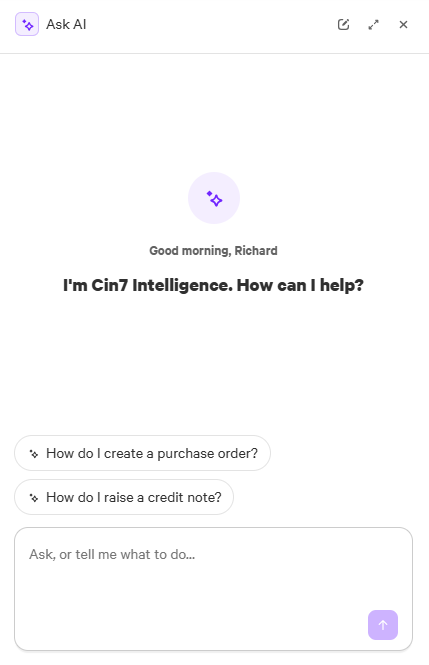
You can also:
- Click Full screen to expand the panel, and Sidebar to return it to the side
- Click New chat to clear the chat and start again
- Click the panel title, Ask AI, to return to one of your Recent chats
Get better answers
AMA gives its best answers when your question includes:
- Metric — what you want to know, like stock on hand, order value, or number of orders
- Subject — the product, customer, supplier, or order it's about
- Time period — like last month or the last 90 days
- Filter — anything that narrows the results, like a branch or an order status
For example, instead of "How's my stock?", ask "What's the stock on hand of SKU ABC-123 at each branch?"
AMA remembers your chat, so you can follow up on its last answer. For example, after you ask for open sales orders, ask "Which of those are for Acme Ltd?" Start a new chat when you change topic, so earlier questions don't shape new answers.
If AMA can't find a customer, product, or order you've named, or no help center article answers your question, it tells you rather than guessing.
Support tickets
Raise a ticket with Cin7 Support without leaving AMA:
- Ask AMA to raise a support ticket, like "Raise a support ticket about my Shopify orders not downloading".
- Answer any questions AMA asks about your issue.
- Review AMA's summary, then reply "Create the ticket".
AMA sends your ticket and your chat to Cin7 Support. This can take up to a minute. The outcome doesn't appear in the chat — Support replies by email.
What AMA can't do
AMA can't:
- Export or attach files
- Share outage information
- Create or edit records, or change settings
- See other accounts' data or search the internet
- Forecast demand or see ForesightAI forecasts. Use ForesightAI instead
- Send notifications, schedule tasks, or contact anyone outside Cin7 Support
- Recommend journal entries when reports don't match